AI for small business in New Zealand, on a job you can name.
The short version. An hour on AI is NZ$150 and a written plan is NZ$490, no GST added. You leave knowing which jobs in your business are worth handing to a machine, which are not, and what each would cost to build and to run. If the answer is that you do not need any of it, that is what you will be told.
What AI automation actually means, in plain English
Three quite different things get called AI, and most of the confusion, and most of the overspending, comes from mixing them up.
Chat tools you type into. ChatGPT, Microsoft Copilot, Google Gemini and Claude. You ask, it answers, and you copy the useful part somewhere else. Cheap or free to try, and for plenty of owners this is the whole of it: drafting an awkward email, tidying a price list, explaining a clause in plain words. The catch is what people paste in, which the privacy section below covers.
Plain automation. Two tools you already pay for, joined so information moves between them on its own. The web form lands in the job software, the paid invoice marks the job done, the new customer gets the welcome email. There is no AI in it at all, and it is often the most useful thing on the list. On this site it sits under email, forms and automations.
An AI step inside a workflow. Plain automation with one step in the middle that needs reading or writing: pulling the name, address and job type out of a messy email, or drafting a reply for a person to approve. The AI does the part a fixed rule cannot, and everything around it stays plain and predictable.
Four sizes of AI job, smallest first
Kind
What it does
Everyday example
When it is the right size
What goes wrong
Plain automation
Moves information between two tools by fixed rules. No AI in it.
A web enquiry lands in your job software without anyone retyping it.
The steps never change and nothing needs reading or judging.
A tool renames a field and it quietly stops, so it needs a check that it ran.
AI step in a workflow
Plain automation with one step that reads or writes something.
An emailed order becomes a draft job with the name, address and items pulled out.
The input is messy but the result always has the same shape.
It misreads a detail, so it asks when unsure and a person checks.
Site assistant (chatbot)
Answers visitors from your own pages, prices and documents.
"Do you do ACC?" answered at nine at night from your own website.
The same questions arrive all week and your site already has the answers.
It answers beyond your content, unless it is built to hand over instead.
AI agent
Takes actions on its own as well as answering.
Reads the inbox, books the job and sends the confirmation by itself.
Rarely at small business scale, and never where a mistake costs money.
It acts on a mistake before anyone has seen it.
Most small business wins are plain automation plus one AI step. The agent is the one in the headlines, and it is the one I would talk you out of first.
Six jobs that come up
Where AI actually helps a small business
Almost every business that ends up wanting this did not start by wanting AI. They started by being sick of doing the same thing twice. These are the shapes that come up.
Typing it twice
The same details, in two systems
A job comes in one way and has to be retyped into the other: the quote into the invoice, the email into the job sheet, the order into the spreadsheet. The usual answer from the software industry is to move your whole business onto one platform. That is a big, expensive change. Joining the two things you already pay for is a much smaller one, often plain automation with no AI in it, and usually the right size of fix.
The same five questions
Answering what the site could answer
Where are you, what does it cost, do you do this, how long does it take, can you come to me. If most of your inbox is five questions your own website already answers, an assistant reading your real pages and prices can take the first pass and hand you the ones worth your time.
The evening job
Paperwork after the actual work
Writing up the day, chasing the photo, turning six voice notes into something useful. This is the one people feel most, and it is also the one where the honest answer is most often "partly". A machine can draft it. A person still has to read it before it goes anywhere near a customer, and on this site that is a rule rather than a setting.
New stock
Product descriptions and listings
Every new line needs a description for the website, another for Trade Me and a caption for Instagram, all from the same supplier sheet. A model can draft all three in your own wording, as drafts you approve. If you are on Shopify it already has a writer built in, so the first check is whether that one is good enough.
The inbox sort
Sorting the inbox and drafting the reply
Enquiries, supplier updates, invoices and junk, all in one place. An AI step can sort them, pull out what each one is asking for, and draft a reply to the ones that need one. You read the drafts and press send. Nothing goes to a customer on its own.
Quotes
Quoting from notes, photos and a price list
The quote written at nine at night from six photos and a voice note. A model can turn those into draft quote lines from your own price list, in your own wording, so you are checking a draft instead of starting from blank. It never sets a price by itself, and you read every line.
Before you buy anything
The AI already inside tools you pay for
A lot of small businesses already pay for AI and have never switched it on. Before anything gets built, it is worth knowing what is sitting in the tools on your card each month.
Xero has JAX, its own AI assistant, built in. It answers questions about your numbers and helps with routine accounting jobs.
Microsoft 365 includes Copilot Chat on many business plans. The fuller Copilot, which works inside your own email and files, is an add-on or part of a higher plan.
Google Workspace now includes Gemini in most of its business plans, inside Gmail, Docs and Sheets.
Shopify has Shopify Magic, which drafts product descriptions and email copy on paid plans.
Trade job software such as Tradify, Fergus and ServiceM8 already sends reminders and quote follow ups and passes invoices to Xero. Check what yours does before paying anyone to rebuild it.
So the first move is often switching on something you already pay for, and learning to use it properly. That is a real answer and a cheap one. The hour tells you which of these you have, whether it is good enough for your job, and only then whether anything needs building. What each plan includes changes often, so I check your actual plan rather than trusting a list like this one.
Illustrative examples, not clients
Worked examples of AI in a small business
Five made-up businesses, so you can see the shape of the work in one that looks like yours. None of them is a client and none of this happened. Each one shows what would be worth doing, what a person keeps doing, and what I would leave alone.
Illustrative example
A plumber with one apprentice
Say you run a plumbing business in Pakuranga with one apprentice, Xero for the invoices and a job app on your phone.
The job
Enquiries arrive by web form, email and text, and every one gets retyped into the job app at night.
Automated, it would look like
Each enquiry becomes a draft job with the name, address, job type and photos already in it. When a detail is missing it asks the customer, rather than guessing.
A person still
Decides which jobs to take, prices every one, and reads anything before it reaches a customer.
Building an AI phone answering service, which is cheaper to rent, or anything that sets a price by itself.
Illustrative example
A physio clinic with three practitioners
Say you run a physio clinic in Tauranga with three practitioners, online booking and a front desk that is always on the phone.
The job
Reception answers the same questions all day. Do you do ACC, do I need a referral, what does the first visit cost, where do I park.
Automated, it would look like
An assistant on the clinic website answers those from the clinic's own pages, prices and ACC information, says so when it does not know, and hands over to reception.
A person still
Reception handles every booking change and anything about a person's body. The assistant gives no clinical advice and asks for no health details, which the Health Information Privacy Code 2020 would cover.
Clinical notes, triage or ACC coding. Health has its own approved tools and professional rules for notes, and patient details never go into a free chat tool.
Illustrative example
A homewares shop on Shopify
Say you run a homewares shop in Christchurch with a Shopify store, some stock on Trade Me, and new lines arriving every fortnight.
The job
Writing a description for every new line, twice, and answering the same emails about shipping and returns.
Automated, it would look like
Descriptions drafted in your own voice from the supplier sheet and placed in Shopify as drafts. Shipping and returns questions answered from your published policy, word for word.
A person still
Approves every description, and checks any claim about materials or origin against the supplier sheet. An invented "pure wool" is misleading under the Fair Trading Act whoever typed it.
Automatic replies to reviews, automatic price changes, or paying for descriptions if the writer Shopify already includes is good enough for you.
Illustrative example
A cafe that also does functions
Say you run a cafe in Wellington that also takes function bookings, with a booking system, a roster app and an Instagram account.
The job
Function enquiries arrive by email and Instagram and each needs a tailored reply, on top of the same questions about hours, dogs and gluten free all week.
Automated, it would look like
Each function enquiry becomes a short summary of the date, numbers, budget and dietary needs, with a draft reply and the function pack attached, waiting for the manager.
A person still
The manager approves every reply, and a person answers every allergy question, every time.
Phone bookings and rosters. The booking system and the roster app already do those, so use their features rather than paying for a build.
Illustrative example
A trades supplier with a trade counter
Say you run a trade supply business in Hamilton with a counter, two reps and account customers who email their orders in.
The job
Orders arrive as emails, PDFs and photos of handwritten lists, and someone retypes every line into the stock and invoicing system.
Automated, it would look like
Each order is read, the lines are matched to your product codes, and a draft order goes into the system. The same build drafts the back order email and turns quote requests into draft quotes.
A person still
Checks every line it could not match with confidence, confirms stock, and approves the order before it is picked.
Account pricing and credit decisions. Both stay with a person, because a model is at its most confident exactly when it is wrong.
Each of these would also have a running cost, because AI charges by use. It is not guessed here: for a real business the expected monthly figure goes in writing before you agree to anything.
The part nobody sells
What not to automate in a small business
A plan that says yes to everything is a sales document. Here are the jobs I would leave alone, and I would rather you read that before you pay me than after.
Anything you do once a month. If a job takes twenty minutes and happens monthly, automating it costs more than it will ever return, and now you own a thing that can break. Do it by hand and spend the money on the daily job instead.
The conversation that wins the work. The first real reply to a serious enquiry is usually the reason you get the job. Drafting it faster is fine. Sending it without reading it is how you lose work in a way you never find out about.
Anything where being wrong is expensive. Pricing, compliance, dosages, measurements, anything legal. These systems are confident when they are wrong, which is the worst possible failure mode for exactly this category. A person checks, every time, or we do not build it.
A job nobody has written down. If the process only exists in one person's head and changes depending on the day, automating it just makes the inconsistency faster. Write it down first. Sometimes writing it down turns out to be the whole fix, and that is a good outcome, not a wasted session.
The process
How the AI work runs, step by step
Five steps, and you can stop after any of them. The timings are the ones on the pricing page.
The paid hour
NZ$150, on the phone or at your table, usually within a week of booking. You talk me through how the work flows, and you leave with a straight answer and a short written summary.
The written plan
NZ$490. A longer session going through the work, then a plan naming the jobs worth handing over, the ones that are not, and what each would cost to build and to run. Typically delivered a week after the session.
The build
One job, from NZ$1,790, or up to three built into the work, from NZ$3,990. Mapped and agreed in writing first, built between tools you already pay for, on accounts in your name. One job is typically running 2 weeks after we have access to the tools.
Handover
It runs alongside the manual way until you are happy to switch. You get a written note of what it does, what it costs to run and how to turn it off, and where staff use it every day, a walkthrough and a one page guide.
Running cost, watched in your own accounts
AI charges by use, so there is a monthly running cost on top of the build. The expected figure is in writing before you commit, the bills come to your card rather than mine, and on the bigger build you set a cap.
Prices
AI prices for NZ small business, no GST added
The same numbers as the pricing page. The first one is deliberately cheap enough to risk on a maybe, and the two build prices are from prices because they move with how many tools a job touches.
Ask me anything
An hour on AI
NZ$150
For anyone who wants a straight conversation about AI before spending a cent on it. Bring the questions you have not wanted to ask in front of a salesperson.
For a business that wants AI inside the job it already does: drafting quotes, sorting the inbox, writing product descriptions, summarising what a customer sent through.
Typically live in 5 weeks once we have your content and your access.Talk about an AI build
The AI we have shipped so far is in our own products, not in a client's business, and you should hear that from us before you pay for it rather than after. So the honest order is to start small. An hour on AI is the cheapest way in, and the advice session ends in a written plan that says whether the rest is worth building. Both come off the price of a build: the hour against anything you go on to build, the plan against an AI build started within 90 days. Automating a job and building AI into the work are from prices, because they move with how many tools the job touches and how many steps it has, and the plan tells you where yours lands before you pay for a build. What we will not do is promise you a percentage saved or hours back, because nobody can know that before your work is mapped. AI tools charge by use, on accounts in your name, so there is a running cost each month on top of the build, and the expected figure goes in writing before you commit. Anything that reaches a customer is either approved by a person first or built so you can switch it off in a minute. All prices are in New Zealand dollars, with no GST added. Tea Break Studio is not registered for GST, so no GST is charged on any price, quote or invoice.
Privacy
AI and privacy: your customers' data and the Privacy Act
This is the part most AI pages skip, and for a small business it is the part most likely to cause real trouble.
The Privacy Act 2020, in plain terms. It applies to any business holding information about people it could identify, which is every business with a customer list. Collect only what you need, tell people what you do with it, keep it secure, and let them see and correct it. None of that stops applying because a machine is doing the handling. Health information has its own, stricter code, the Health Information Privacy Code 2020.
Sending it overseas. Information privacy principle 12 covers sending personal information outside New Zealand, and most of the big AI models run on servers overseas. If a provider only processes it on your behalf, the Act treats it as still held by you, and you stay responsible for it. If the provider keeps it or uses it for its own purposes, such as training its models, that can count as disclosing it overseas. Principle 12 then asks whether it will be protected in a comparable way, or whether the person agreed knowing it might not be. So for every job I name the provider, and where it processes the data, before anything is built.
What never goes into a free tool. Customer names with their details, health information, bank and card numbers, passwords, staff matters, and anything covered by a confidentiality agreement. Free and personal accounts can use what you type to improve the product unless you switch that off. Business plans can be set not to train on your data, which is one good reason to pay for them.
Whose accounts it sits in. Yours. Every account is set up in your name, with your card, so you can see what is being spent and switch it off without asking me. The Privacy Commissioner also expects a person to check what a tool produces before anyone acts on it, and that is how everything here is built.
Once more than one person uses AI at work, write the rules down. It does not need a lawyer or twenty pages. It needs to cover six things.
What never gets pasted in. Customer details, health information, bank details, passwords, staff matters, and anything under a confidentiality agreement.
Which tools are approved. Named, on business accounts the business controls, and personal accounts are not used for work.
Who checks the output. Anything that reaches a customer, a price or a contract is read by a named person first.
What happens when it gets something wrong. Who to tell, how it gets fixed, and whether a customer needs to hear about it.
Telling customers. Where AI is used on something a customer sees, say so plainly.
When it gets looked at again. Every six months or so, because the tools change faster than the policy.
Staff quietly using their own ChatGPT accounts for work is the usual way a business ends up with customer details somewhere it never agreed to. The fix is an approved tool and this page. business.govt.nz has a good plain guide to safe and smart AI use, and writing your policy is something the hour can cover.
Funding
Government AI funding for small business: the Advisory Pilot
MBIE runs an AI Advisory Pilot through the Regional Business Partner Network. It co-funds part of the cost of working with an approved adviser, to find where AI fits in a business and to put it in place. It has been expanded since it launched and the details have changed with it, so check them at the source rather than on a page like this.
The part that matters here: the work has to be delivered by an MBIE registered provider for the pilot. Tea Break Studio is not an MBIE registered provider, and nothing I sell is eligible for the co-funding. If your project is big enough that co-funding would make a real difference, talk to your Regional Business Partner first and check the current rules on business.govt.nz. If you want to find out whether you have a project at all, the hour here is quicker than the paperwork.
Words you will hear
AI terms in plain English
Eight words that come up in every conversation about this, without the jargon.
Large language model
The kind of AI behind ChatGPT, Copilot, Gemini and Claude. It has read an enormous amount of text and predicts what comes next, which is why it writes well and is sometimes confidently wrong.
Hallucination
When a model states something false as if it were true. It is the main reason a person checks anything that matters.
Grounding
Making a model answer only from your own pages and documents, and say so when the answer is not in them.
Site assistant
A chat window on your website that answers from your own content and hands over to a person when it cannot help. The careful kind of chatbot.
AI agent
AI that takes actions as well as answering, such as booking, sending or changing records. Useful in places, and the riskiest kind for a small business.
Tokens
The small pieces of text AI providers charge by, roughly three quarters of a word each. They are why AI has a running cost every month.
Data residency
Where your data is stored and processed. For most of the big models that is overseas, which matters under the Privacy Act.
Human in the loop
A person reviews what the AI produced before anything happens. On anything here that reaches a customer, that is the rule.
The honest bit
Proof: what I have built with AI, and what I have not
This is the section where an AI page normally shows you six client logos and a number with a per cent sign after it. Here is what is actually true instead.
The AI I have shipped, and where it runs.
Most pages selling AI in this country show you logos and a percentage. Here is the honest version, and you should have it before you pay rather than after. No AI I have built is running inside a client's business yet. The AI I have shipped is in two products of my own, and you can open both right now.
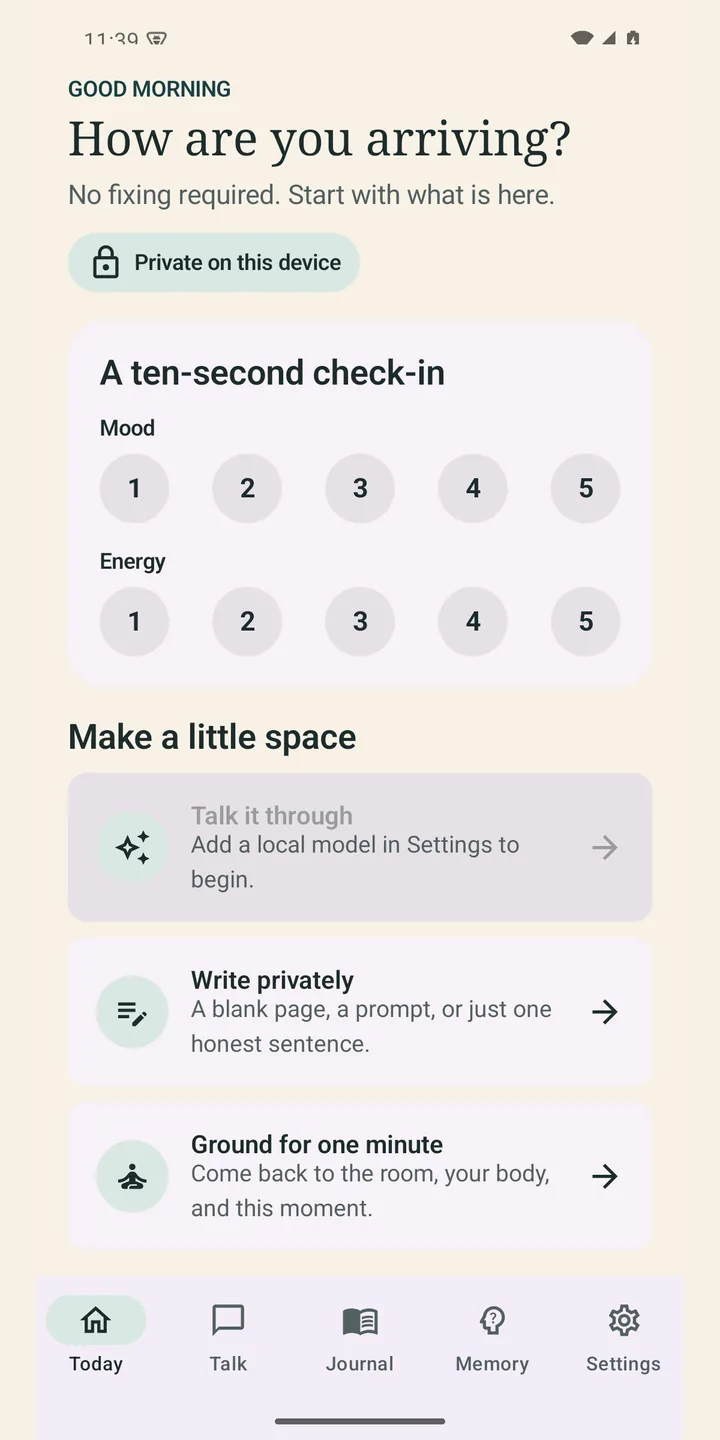
Harbour ThoughtsToday
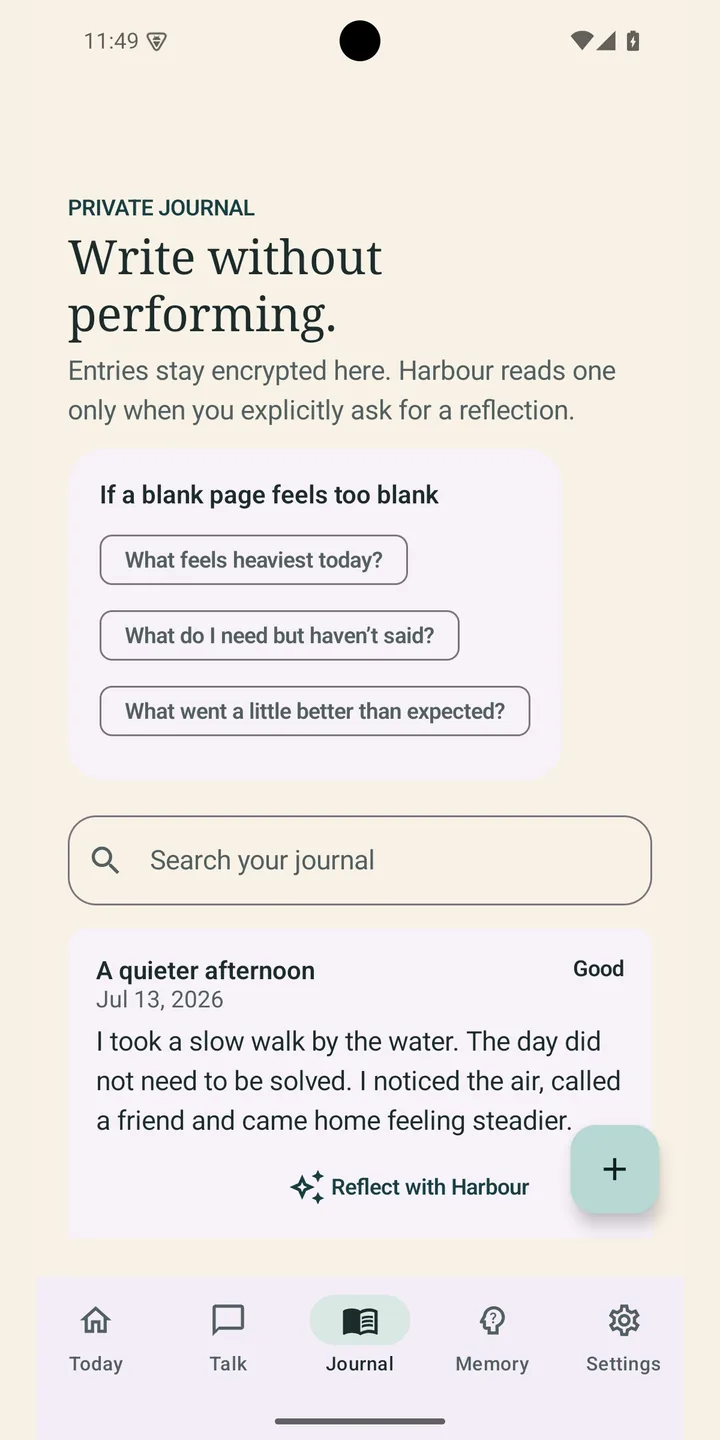
Harbour ThoughtsJournal
Harbour Thoughts: AI that runs on the phone
Harbour Thoughts is a journal and reflection app, and the part that matters for you is where its AI runs. Once the model has been downloaded, it runs on the device rather than on somebody's server. No account is needed, and your journal entries stay on the device.
That is the same question your business has. Where does the thinking happen, whose machine holds the data, and what leaves the building. I have had to answer it for real, in shipped code, rather than in a slide.
Snagged: drafts from your own documents, approved by a person
Snagged is my free job board for the Pohutukawa Coast and east Auckland. Its CV and cover letter tool is live: paste a job ad, and a hosted model drafts a CV and letter for that job from the person's own CV. A second automatic pass checks the draft against the CV and takes out claims it cannot support. That check is a safety net rather than a guarantee, so the person reads and approves every line before it goes anywhere.
It is closer to what a business would buy than Harbour is: a model drafting from your own documents, a check, and a person approving before anything reaches anyone.
So the order here starts small. An hour on AI is the cheapest way in, at NZ$150, and the written plan at NZ$490 says whether the rest is worth building. Both come off the price of a build if you go ahead, the plan when the build starts within 90 days. If the honest answer is that your business does not need any of this yet, that is what you will be told.
If the website is the real problem
Sometimes the thing eating the week is not a job for a machine, it is a site that does not answer anything, so every question arrives in the inbox instead. Putting an assistant on top of that is treating the symptom. If that sounds like yours, the website work is the cheaper fix and I will say so in the session rather than sell you the assistant. And if you are on this side of Auckland, there is AI help in east Auckland at your own table.
Written by Nick, who runs Tea Break Studio from Beachlands. Last reviewed 25 September 2026.
Straight answers
AI for small business: the questions people open with.
Including the two most pages avoid: what it costs, and whether you need it at all.
Here, it starts at NZ$150 for an hour, no GST added, and you leave knowing whether anything is worth doing. A written plan naming the jobs worth handing over is NZ$490. Automating one job is from NZ$1,790, an assistant on your own site is NZ$2,390, and AI built into the way you work is from NZ$3,990. Most places in this market will not publish a number at all and ask you to book a discovery call instead. These are the same numbers as the pricing page, no GST added.
Quite possibly you do not, and that is a real answer you are allowed to get. Most businesses have one or two jobs where it genuinely helps, usually something repetitive that a person is retyping, and a lot of jobs where it would add cost and risk for nothing. That is the point of starting with a paid hour rather than a free call: a free call has to end in a sale to be worth the caller doing, and a paid hour does not. If the honest answer is that your business does not need any of this yet, the session says so, and you have spent NZ$150 finding out instead of thousands.
Often it is enough, and the hour will tell you so. A chat tool is the right size when one person is drafting, summarising or tidying their own work. Something built earns its place when the job runs between two systems, happens many times a day, or has to answer from your own prices and documents rather than from the internet. If what you need is to use the tool you already pay for properly, that is what you will hear.
No, and you should hear that from me rather than work it out later. The AI I have shipped runs inside two products of my own. Harbour Thoughts is a journal app whose AI, once downloaded, runs on the phone itself. Snagged is a local job board where a hosted model drafts a CV and cover letter from the person's own CV, a second pass checks the draft, and the person approves every line. You can open both today. What I am not going to do is show you logos of companies I have not done this for. The paid hour exists partly because of this: it is a small, reversible way to find out whether I am any use to you.
Not into a free or personal account. Those can use what you type to improve the product unless you switch that off, and a provider keeping your customers' details overseas for its own use is exactly what principle 12 of the Privacy Act is about. Use a business plan set not to train on your data, give staff the do-not-paste list from the AI policy section on this page, and keep names, health details and bank details out of it altogether.
Usually not all of it. Most of the big AI models run in data centres overseas, and a few providers can keep data in Australia on the right plan. What I do is name the provider for each job and where it stores and processes the data, before anything is built, so you decide with that in front of you. If you are not comfortable with where a job would send customer details, it does not get built that way.
Every account goes in your name, with your own card on it, so you can see what is being spent and switch it off in a minute without asking me. Under the Privacy Act 2020 you stay responsible for personal information about your customers even when a supplier is doing the handling, so if a job would send customer details offshore, you hear that first and you decide. Anything that reaches a customer is approved by a person rather than sent automatically.
It can, which is why the assistant I build answers only from your own pages, prices and documents, and is set up to hand over rather than answer what it does not know. Before it goes live it is tested against a list of real questions you give me. Afterwards you see every conversation, and you fix a wrong answer by editing your own content.
It depends on which job you automate and how often it runs, and anyone giving you a monthly figure before looking at your work is guessing. What I do is write the expected running cost down before you agree to the build, in your own accounts so you can watch it. Worth knowing when you are comparing: a subscription product looks cheaper on the day you sign and keeps charging whether you use it or not, while a build is paid once and the running cost is usually the model usage rather than a licence.
I will not give you a number, and I would be careful of anyone who does before they have looked at your business. Percentages and hours-back figures on AI pages are marketing, not measurement. What you get instead is a written plan that names the jobs worth handing over, the jobs that are not worth it, what each would cost to build, and what each would cost to run. Then you decide with real numbers in front of you.
Yes, and it is NZ$2,390. It answers from your own pages, prices and documents rather than making things up, which is the part that matters, and it hands over to you when it does not know. What I would not sell you is an AI phone answering service, because that is a commodity subscription in this country and you would be paying a build price for something you can rent. If that is what you need I will tell you to go and rent it.
One to one, yes, and the hour is often used exactly that way: ChatGPT, Copilot or Gemini used on your real tasks, on your own screens, with the list of what never to paste in and a short written summary afterwards so you are not relying on memory. It is NZ$150. When AI gets built into the work, the package includes a walkthrough for the staff using it and a one page guide to keep.
No. I am in east Auckland and if you are nearby I will happily sit at your table, but almost all of this happens over email, a shared link and a call or two. The advice session works the same on a video call from anywhere in New Zealand. Where you are makes very little difference to the work.
AI for a small business starts with one job. Name yours.
Two sentences is plenty. What the business does, and the thing you or someone on your team keeps doing by hand. I reply in writing with whether it is worth automating, and what it would cost if it is.